SR Theo
Overview
SR Theo is a database that allows clients to upload their own theoretical volatilities. Clients can utilize the SpiderRock curve and make changes to the ATM or other points on the curve, or they can upload their own two-point curve with 15 points on the x-axis and corresponding volatilities on the y-axis. Key features include:
- Upload parameterized or splined theoretical volatility surfaces
- Download per-strike theoretical volatilities, prices, and Greeks
- Manage buy/sell/volatility levels for idea generation and position evaluation
- Integrated with SpiderRock GUIs and other SRSE tables
SR Theo Tables
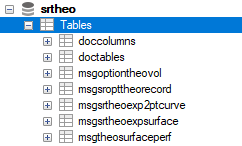
The following image shows the available tables in SR Theo:
Query Examples
The example queries below demonstrate different types of client-theoretical uploads:
- The first example shows how to upload a theoretical surface using the skew function of iCurve (the other supported skew function is TheoSpline).
- The second example demonstrates a TheoSpline upload, which involves a two-message insert process.
Note:
These examples are not meant to be used as actual working queries.
Sample Query 1: Insert a theoretical surface in TSLA with a skew function of iCurve:
DESCRIBE srtheo.msgsrtheoexpsurface;

REPLACE INTO srtheo.msgsrtheoexpsurface
  (ekey_at, ekey_ts, ekey_tk, ekey_yr, ekey_mn, ekey_dy, theomodel, clientfirm,
   ticker_at, ticker_ts, ticker_tk, skewfunc, theovol, Buysellconvention, divrule,
   theostatus, Modifiedby, modifiedin, updated, TIMESTAMP)
VALUES
  ('EQT', 'NMS', 'TSLA', 2025, 7, 18, 'EV.FL', 'SRTEST', 'EQT', 'NMS', 'TSLA',
   'ICURVE', 0.625, 'none', 'UseSRImplied', 'auto', 'user.name', 'Saturn', NOW(), NOW());
Sample Query 2: Insert values to create TheoSpline (two-step process):
Step 1: Create the surface record:
DESCRIBE srtheo.msgsrtheoexpsurface;
DESCRIBE srtheo.msgsrtheoexp2ptcurve;

REPLACE INTO srtheo.msgsrtheoexpsurface
  (ekey_at, ekey_ts, ekey_tk, ekey_yr, ekey_mn, ekey_dy, theomodel, clientfirm,
   ticker_at, ticker_ts, ticker_tk, skewfunc, theovol, theostatus, updated,
   modifiedby, modifiedin, TIMESTAMP)
VALUES
  ('EQT', 'NMS', 'MSFT', 2025, 7, 18, 'EV.FL', 'SRTEST', 'EQT', 'NMS', 'MSFT',
   'Theospline', 0.24, 'Auto', NOW(), 'user.name', 'Saturn', NOW());
Step 2: Insert the curve points:
REPLACE INTO srtheo.msgSrTheoExp2PtCurve
  (ekey_at, ekey_ts, ekey_tk, ekey_yr, ekey_mn, ekey_dy, theomodel, CLIENTFIRM,
   ticker_at, ticker_ts, Ticker_tk, xAxisType, axisvol,
   x00, x01, x02, x03, x04, x05, x06, x07, x08, x09, x10, x11, x12, x13, x14,
   y00, y01, y02, y03, y04, y05, y06, y07, y08, y09, y10, y11, y12, y13, y14, TIMESTAMP)
VALUES
  ('EQT', 'NMS', 'MSFT', 2025, 7, 18, 'EV.FL', 'SRTEST', 'EQT', 'NMS', 'MSFT', 'Strike', 0.24,
   300, 330, 340, 350, 360, 370, 375, 385, 390, 395, 400, 410, 420, 430, 440,
   0.3152, 0.3003, 0.286, 0.280, 0.27, 0.255, 0.250, 0.2425, 0.2482, 0.25, 0.2525, 0.262, 0.27, 0.275, 0.28, NOW());
Sample Query 3: Bulk load via LOAD DATA INFILE:
This query structure can be used for any table—simply replace tableName with the desired SR Theo table name. The client must direct the query to the location of the corresponding file on their local machine.
LOAD DATA LOCAL INFILE 'desktop\\filename.csv' INTO TABLE srtheo.tableName
FIELDS ESCAPED BY '\\' TERMINATED BY ',' ENCLOSED BY '"'
LINES TERMINATED BY '\r\n' IGNORE 1 LINES;
OptionTheoVol Table
The OptionTheoVol table displays the theoretical volatility values for individual strikes of the curve that have been entered by clients. To view data in this table, users must first set the SRSE source for the connected instance:
SET srse_theo_model = 'EV.CB:SCORE';
Sample Query 4: Once the SRSE Theo model has been set, retrieve theoretical volatility data:
SELECT * FROM srtheo.msgoptiontheovol
WHERE okey_at = 'EQT' AND okey_tk IN ('SPX') AND okey_yr = 2025 AND okey_mn = 10 AND okey_dy = 17;
This table includes the theoretical volatility, theoretical price, and any buy and sell prices defined within the client's theoretical model. It also provides the associated Greeks, along with the option bid and ask, SpiderRock surface volatility, surface price, and SpiderRock delta.
The table can be queried in the same way as the LiveImpliedQuote table, allowing clients to create customized scans and use these values when setting limits on parent orders. Additionally, this table can be used in conjunction with risk records and the SpiderRock Option Calculator to enable clients to create customized risk slides based on their own theoretical values.