Routing Logic Implementation
Introduction
This document provides guidance on SpiderRock's routing algorithms — covering which algo best corresponds to a desired execution style, how market liquidity factors into that selection, and how to configure the relevant order parameters.
The examples below illustrate the range of available routing behaviors and demonstrate how to implement order parameters across the following interfaces:
- The SpiderRock GUI Tools / order entry tickets
- SRSE (SpiderRock Storage Engine – SQL Live API)
- The SpiderRock Client FIX Gateway
For additional information on algo parameters, contact the SpiderRock Support Desk at cs@spiderrock.net.
Table of Contents
| Section | Algos | Description |
|---|---|---|
| Single or Multi-Line Sweeps | SpdrSweep | Immediately removes existing liquidity in a single option or across an entire expiration surface |
| Active Taker | ActiveTaker | Takes liquidity using a primary limit, optionally combined with a dynamic secondary limit |
| Active Maker | PostWith, PostWthF, PostTurn, PostImpr, PostLimit, PostFlash, PostFlashI, PostFlashW | Posts liquidity within the NBBO, more or less aggressively depending on the posting algo |
| Active Taker Paired with an Active Maker | ActiveTaker with a posting algo | Takes and posts liquidity on the same order |
| Multi-Leg Algos | Seeker, Seek/Legger, Legger | Works strike-specific spreads as a package or by legging each leg |
| Progression Algos | TwapAlpha, VwapAlpha, SpdrPulse | Works an order in slices at increasing levels of aggressiveness |
Single or Multi-Line Sweeps
SpdrSweep is a sweep strategy that can be used to immediately remove existing liquidity in a single option or entire expiration surfaces.
- SpdrSweep removes liquidity only
- A limit price is set $0.10 through the market and does not update
- The time in force for this strategy is set to Immediate-or-cancel (IOC)
- The execution engine synchronizes the delivery of child orders across exchanges in exchange fee, size, or price level priority depending on order size vs. visible market size
- For example, if the order size is less than visible market size, the execution engines will typically sweep in exchange fee order. If order size is greater than visible market size, the execution engines will tend to sweep in price level priority
- ISO orders can be supported via SpiderRock as an executing broker
GUI Tools Example
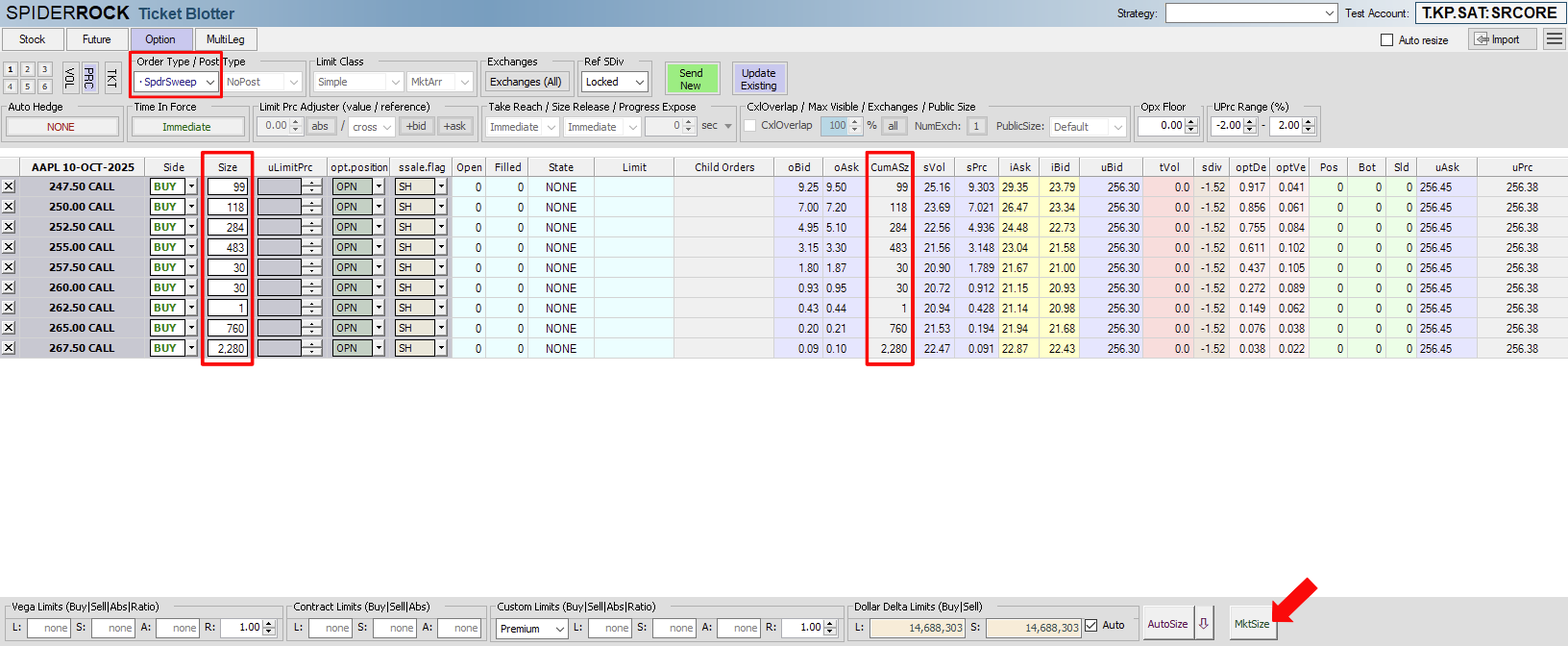
- User selects SpdrSweep under the Order Type drop down list
- Other fields will auto-populate with proper settings – Under Limit Class, MktArr refers to the limit set to $0.10 through the market at time of order arrival - TIF defaults to IOC
- User can click on MktSize to size the basket, which will populate the immediately available cumulative liquidity on the bid (for buy orders) or offer (for sell orders)
SRSE and FIX Examples
- SRSE
- FIX
-
Sell single line sweep order for 100 AAPL 255 Call expiring on 10-17-2025:
REPLACE INTO srtrade.msgoptordergateway (accnt, clientFirm, spdrActionType, groupingCode, okey_at, okey_ts, okey_tk, okey_yr, okey_mn, okey_dy, okey_xx, okey_cp, orderSide, orderSize, marketSession, orderLimitType, parentOrderHandling, parentBalanceHandling, takeLimitClass, makeLimitClass, autoHedge, riskGroupId, traderName, CHECKSUM)
VALUES ('T.ACCNT', 'SRCORE', 'AddReplace', '1000-0000-0867-5309', 'EQT', 'NMS', 'AAPL', 2025, 10, 17, 255, 'Call', 'Sell', 100, 'RegMkt', 'MarketArrival', 'ActiveTaker', 'None', 'Simple', 'Simple', 'Spdrauto', '1000-0000-0867-5309', 'user.name', 13); -
Sell multi-line sweep order for 100 AAPL Calls at strikes corresponding to an absolute delta of .30 through .70 and expiring on 10-17-2025:
REPLACE INTO srtrade.msgoptordergateway (accnt, clientFirm, spdrActionType, groupingCode, okey_at, okey_ts, okey_tk, okey_yr, okey_mn, okey_dy, okey_xx, okey_cp, orderSide, orderSize, marketSession, orderLimitType, parentOrderHandling, parentBalanceHandling, takeLimitClass, makeLimitClass, autoHedge, riskGroupId, traderName, CHECKSUM)
(SELECT 'T.ACCNT', 'SRCORE', 'AddReplace', '2000-0000-0867-5309', okey_at, okey_ts, okey_tk, okey_yr, okey_mn, okey_dy, okey_xx, okey_cp, 'Sell', 100, 'RegMkt', 'MarketArrival', 'ActiveTaker', 'None', 'Simple', 'Simple', 'Spdrauto', '2000-0000-0867-5309', 'user.name', 13
FROM sranalytics.msgliveimpliedquoteadj
WHERE okey_tk = 'AAPL' AND okey_yr = 2025 AND okey_mn = 10 AND okey_dy = 17 AND ABS(de) > .30 AND ABS(de) < .7);
Sell single line sweep order for 100 COST 300 Call expiring on 06-19-2020:
8=FIX.4.4|9=111|35=D|49=SENDER|56=SPIDERROCK|11=ORDER001|1=T.TEST|55=COST|167=OPT|541=20200619|202=300.0|201=1|
54=2|38=100|5094=1|5098=1|10=111|
Corresponding FIX Tags
| Option | GUI Tool | FIX Tag | FIX Value |
|---|---|---|---|
| Order Type | ActiveTaker | 5094 | 1 |
| Post Type | NoPost | 5096 | 0 |
| Take Limit Class | Simple | 5100 | 0 |
| Make Limit Class | Simple | 5102 | 0 |
| Order Limit Type | MarketArrival | 5098 | 1 |
Active Taker
ActiveTaker, NoPost is a strategy that can help clients optimize their taking aggression. Users can implement a primary volatility or delta-adjusted limit only, or a primary limit in combination with a secondary limit that is dynamically reacting to market micro dynamics. Secondary limits can be expressed in alpha probabilities or volatility surface offsets.
What are the secondary dynamic limits?
- Alpha probabilities are a numerical estimate of short-term profitability. A probability of 50% represents a 50% chance to get filled at mid-market or better when measured a few minutes post fill, assuming the trade is delta neutral. Higher probabilities are considered to be passive settings since they score high quality events that occur less frequently in the market. The lower probabilities are, the more aggressively orders will interact with the market. Users can increase trading velocity or fill rates on the fly by dialing down the probabilities, hence statistically pay the market slightly more than mid-market if dialing to a number below 50%.
- Volatility surfaces can also be leveraged as a secondary dynamic limit. Our surfaces are well calibrated through bid/ask channels and are arbitrage-free providing realistic implied mid-market values in real time. Users can express a dynamic limit as an offset to our surface. A positive offset indicates a calibration that is more aggressive than the surface, conversely a negative number indicates a calibration that is less aggressive than our surface.
GUI Tools Example
- In the example below, user is buying NFLX 27-MAR-2020 325.00 and 327.50 calls
- Using the 325 strike, the market is 15.80 at 18.25
- User has set a top limit vol at 85.75, which corresponds to a price of 18.088
- User has also set a take probability at 50%, which corresponds to a price of 16.834 (at time of the screen capture). Note that the engine continually computes the corresponding price to the probability level. So the 50% limit in this example is in effect very dynamic.
- Since the take probability limit is tighter than the user-defined vol limit, the effective limit will be the take probability (rounded to 16.80).
- This means that if there was an offer coming in the market at 16.80, the SpiderRock engine would trigger and IOC order to buy this 16.80 offer.
- Users have access to the probability dial and can modify the aggressiveness of an order by simply changing the probability settings to desired level.

SRSE and FIX Examples
Active Taker order using a probability of .6 (or 60%). In this example, a user would be looking to remove liquidity if someone placed an offer through the middle of the market.
- SRSE
- FIX
REPLACE INTO srtrade.msgoptordergateway (accnt, clientFirm, spdrActionType, groupingCode, riskGroupId, marketSession, okey_at, okey_ts, okey_tk, okey_yr, okey_mn, okey_dy, okey_xx, okey_cp, orderSide, orderSize, orderLimitType, orderVolLimit, parentOrderHandling, parentBalanceHandling, takeLimitClass, takeAlphaType, takeProbability, autoHedge, traderName, CHECKSUM)
VALUES ('T.ACCNT', 'SRCORE', 'AddReplace', '0001-0000-0867-5309', '0001-0000-0867-5309', 'RegMkt', 'EQT', 'NMS', 'SPY', 2025, 10, 17, 665, 'Call', 'Buy', 100, 'Vol', .1173, 'ActiveTaker', 'None', 'Probability', 'Static', .60, 'Spdrauto', 'user.name', 13);
8=FIX.4.4|9=111|35=D|49=SENDER|56=SPIDERROCK|11=ORDER001|1=T.TEST|55=MSFT|167=OPT|541=20200417|202=150.0|201=1|
54=1|38=100|5098=9|5116=0.2040|5094=1|5100=2|5128=1|5136=0.60|10=111|
Corresponding FIX Tags
| Option | GUI Tool | FIX Tag | FIX Value |
|---|---|---|---|
| Order Handling | ActiveTaker | 5094 | 1 |
| Order Limit Type | Vol | 5098 | 9 |
| Take Limit Class | Probability | 5100 | 2 |
| Take Alpha Type | Static | 5128 | 1 |
| Take Probability | Probability | 5136 | 0.60 |
Active Maker
PostOnly, PostAbc: These strategies enable clients to post liquidity between the NBBO more or less aggressively depending on the type of posting strategy they select. They can be used in conjunction with a user-defined volatility or delta-adjusted limit only, or in combination with a secondary limit that is dynamically reacting to market micro dynamics. Such secondary limits can be expressed in alpha probabilities or volatility surface offsets.
Types of Posting Algos with GUI, SRSE, and FIX Examples
PostWith
This posting algo enables orders to post on the NBBO if the order price is greater than the NBBO. This algo continues to post on the bid (if buying) or offer (if selling) until the market fades; it will fade with the rest of the market once the order is alone at that price.
- GUI Tools
- SRSE
- FIX

REPLACE INTO srtrade.msgoptordergateway (accnt, clientFirm, spdrActionType, groupingCode, riskGroupId, marketSession, okey_at, okey_ts, okey_tk, okey_yr, okey_mn, okey_dy, okey_xx, okey_cp, orderSide, orderSize, parentOrderHandling, parentBalanceHandling, takeLimitClass, makeLimitClass, orderLimitType, orderVolLimit, autoHedge, traderName, CHECKSUM)
VALUES ('T.ACCNT', 'SRCORE', 'AddReplace', '0002-0000-0867-5309', '0002-0000-0867-5309', 'RegMkt', 'EQT', 'NMS', 'AAPL', 2025, 10, 17, 255, 'Call', 'Sell', 100, 'PostOnly', 'PostWith', 'Simple', 'Simple', 'Vol', 0.211, 'Spdrauto', 'user.name', 13);
8=FIX.4.4|9=111|35=D|49=SENDER|56=SPIDERROCK|11=ORDER001|1=T.TEST|55=COST|167=OPT|541=20201016|202=310.0|
201=1|54=2|38=100|5094=2|5096=1|5098=9|5116=0.4380|10=111|
Corresponding FIX Tags
| Option | GUI Tool | FIX Tag | FIX Value |
|---|---|---|---|
| Order Handling | Post Only | 5094 | 2 |
| Balance Handling | PostWith | 5096 | 1 |
| Order Limit Type | Vol | 5098 | 9 |
| Take Limit Class | Simple | 5100 | 0 |
| Make Limit Class | Simple | 5102 | 0 |
PostWthF
This posting algo functions similarly to PostWith. It will post an order on the NBBO if the order price is greater than the NBBO. Unlike PostWith however, PostWthF takes into account the size ratio between the bid and offer size. The order will post on the weak side of the market as long as the relationship between the weak and the strong NBBO size is a ratio of at least 1 to 4. If the weak side becomes "weaker" (ratio becomes 1 to 5 or smaller) the order will be pulled from the market. The order will not go back into the market until the size ratio returns to 1 to 4 or something stronger.
- GUI Tools
- SRSE
- FIX

REPLACE INTO srtrade.msgoptordergateway (accnt, clientFirm, spdrActionType, groupingCode, riskGroupId, marketSession, okey_at, okey_ts, okey_tk, okey_yr, okey_mn, okey_dy, okey_xx, okey_cp, orderSide, orderSize, parentOrderHandling, parentBalanceHandling, takeLimitClass, makeLimitClass, orderLimitType, orderVolLimit, autoHedge, traderName, CHECKSUM)
VALUES ('T.ACCNT', 'SRCORE', 'AddReplace', '0003-0000-0867-5309', '0003-0000-0867-5309', 'RegMkt', 'EQT', 'NMS', 'AAPL', 2025, 10, 17, 255, 'Call', 'Sell', 100, 'PostOnly', 'PostWthF', 'Simple', 'Simple', 'Vol', .21, 'Spdrauto', 'user.name', 13);
8=FIX.4.4|9=111|35=D|49=SENDER|56=SPIDERROCK|11=ORDER001|1=T.TEST|55=COST|167=OPT|541=20201016|202=310.0|
201=1|54=2|38=100|5094=2|5096=7|5098=9|5116=0.4380|10=111|
Corresponding FIX Tags
| Option | GUI Tool | FIX Tag | FIX Value |
|---|---|---|---|
| Order Handling | Post Only | 5094 | 2 |
| Balance Handling | PostWithF | 5096 | 7 |
| Order Limit Type | Vol | 5098 | 9 |
| Take Limit Class | Simple | 5100 | 0 |
| Make Limit Class | Simple | 5102 | 0 |
PostTurn
This posting algo will allow a user to improve the NBBO. If the limit price of an order is greater than the NBBO, this algo will improve the NBBO by a single price increment. The algo will not improve the NBBO again unless someone joins with 100% of the posted size.
- GUI Tools
- SRSE
- FIX

REPLACE INTO srtrade.msgoptordergateway (accnt, clientFirm, spdrActionType, groupingCode, riskGroupId, marketSession, okey_at, okey_ts, okey_tk, okey_yr, okey_mn, okey_dy, okey_xx, okey_cp, orderSide, orderSize, parentOrderHandling, parentBalanceHandling, takeLimitClass, makeLimitClass, orderLimitType, orderVolLimit, autoHedge, traderName, CHECKSUM)
VALUES ('T.ACCNT', 'SRCORE', 'AddReplace', '0004-0000-0867-5309', '0004-0000-0867-5309', 'RegMkt', 'EQT', 'NMS', 'AAPL', 2025, 10, 17, 255, 'Call', 'Sell', 100, 'PostOnly', 'PostTurn', 'Simple', 'Simple', 'Vol', .21, 'Spdrauto', 'user.name', 13);
8=FIX.4.4|9=111|35=D|49=SENDER|56=SPIDERROCK|11=ORDER001|1=T.TEST|55=COST|167=OPT|541=20201016|202=310.0|
201=1|54=2|38=100|5094=2|5096=2|5098=9|5116=0.4380|10=111|
Corresponding FIX Tags
| Option | GUI Tool | FIX Tag | FIX Value |
|---|---|---|---|
| Order Handling | Post Only | 5094 | 2 |
| Balance Handling | PostTurn | 5096 | 2 |
| Order Limit Type | Vol | 5098 | 9 |
PostImpr
This posting algo will allow a user to improve the NBBO. Similarly to PostTurn, if the limit price of an order is greater than the NBBO, this algo will improve by a single price increment. However, this posting algo will improve itself every 30 seconds if there is room to do so. This will continue until the limit price is reached.
- GUI Tools
- SRSE
- FIX

REPLACE INTO srtrade.msgoptordergateway (accnt, clientFirm, spdrActionType, groupingCode, riskGroupId, marketSession, okey_at, okey_ts, okey_tk, okey_yr, okey_mn, okey_dy, okey_xx, okey_cp, orderSide, orderSize, parentOrderHandling, parentBalanceHandling, takeLimitClass, makeLimitClass, orderLimitType, orderVolLimit, autoHedge, traderName, CHECKSUM)
VALUES ('T.ACCNT', 'SRCORE', 'AddReplace', '0005-0000-0867-5309', '0005-0000-0867-5309', 'RegMkt', 'EQT', 'NMS', 'AAPL', 2025, 10, 17, 255, 'Call', 'Sell', 100, 'PostOnly', 'PostImprove', 'Simple', 'Simple', 'Vol', .2112, 'Spdrauto', 'user.name', 13);
8=FIX.4.4|9=111|35=D|49=SENDER|56=SPIDERROCK|11=ORDER001|1=T.TEST|55=COST|167=OPT|541=20201016|202=310.0|
201=1|54=2|38=100|5094=2|5096=3|5098=9|5116=0.4380|10=111|
Corresponding FIX Tags
| Option | GUI Tool | FIX Tag | FIX Value |
|---|---|---|---|
| Order Handling | Post Only | 5094 | 2 |
| Balance Handling | PostImprove | 5096 | 3 |
| Order Limit Type | Vol | 5098 | 9 |
PostLimit
This posting algo will allow a user to post at their limit price.
- GUI Tools
- SRSE
- FIX

REPLACE INTO srtrade.msgoptordergateway (accnt, clientFirm, spdrActionType, groupingCode, riskGroupId, marketSession, okey_at, okey_ts, okey_tk, okey_yr, okey_mn, okey_dy, okey_xx, okey_cp, orderSide, orderSize, parentOrderHandling, parentBalanceHandling, takeLimitClass, makeLimitClass, orderLimitType, orderVolLimit, autoHedge, traderName, CHECKSUM)
VALUES ('T.ACCNT', 'SRCORE', 'AddReplace', '0006-0000-0867-5309', '0006-0000-0867-5309', 'RegMkt', 'EQT', 'NMS', 'AAPL', 2025, 10, 17, 255, 'Call', 'Sell', 100, 'PostOnly', 'PostLimit', 'Simple', 'Simple', 'Vol', .2095, 'Spdrauto', 'user.name', 13);
8=FIX.4.4|9=111|35=D|49=SENDER|56=SPIDERROCK|11=ORDER001|1=T.TEST|55=COST|167=OPT|541=20201016|202=310.0|
201=1|54=2|38=100|5094=2|5096=4|5098=9|5116=0.4380|10=111|
Corresponding FIX Tags
| Option | GUI Tool | FIX Tag | FIX Value |
|---|---|---|---|
| Order Handling | Post Only | 5094 | 2 |
| Balance Handling | PostLimit | 5096 | 4 |
| Order Limit Type | Vol | 5098 | 9 |
PostFlash
This posting algo will flash at the limit price of an order (as long as the limit price is within the NBBO prices). The order will post for half of a second, which is fast enough to not impact the NBBO nor our surface calculations and let fast systems trade with the order. The order will go dark (no child orders) for a random time of 15 seconds up to 2 minutes. At the end of the timer the order will flash the market again.
- GUI Tools
- SRSE
- FIX

REPLACE INTO srtrade.msgoptordergateway (accnt, clientFirm, spdrActionType, groupingCode, riskGroupId, marketSession, okey_at, okey_ts, okey_tk, okey_yr, okey_mn, okey_dy, okey_xx, okey_cp, orderSide, orderSize, parentOrderHandling, parentBalanceHandling, takeLimitClass, makeLimitClass, orderLimitType, orderVolLimit, autoHedge, traderName, CHECKSUM)
VALUES ('T.ACCNT', 'SRCORE', 'AddReplace', '0007-0000-0867-5309', '0007-0000-0867-5309', 'RegMkt', 'EQT', 'NMS', 'AAPL', 2025, 10, 17, 255, 'Call', 'Sell', 100, 'PostOnly', 'PostFlash', 'Simple', 'Simple', 'Vol', .209, 'Spdrauto', 'user.name', 13);
8=FIX.4.4|9=111|35=D|49=SENDER|56=SPIDERROCK|11=ORDER001|1=T.TEST|55=COST|167=OPT|541=20201016|202=310.0|
201=1|54=2|38=100|5094=2|5096=9|5098=9|5116=0.4380|10=111|
Corresponding FIX Tags
| Option | GUI Tool | FIX Tag | FIX Value |
|---|---|---|---|
| Order Handling | Post Only | 5094 | 2 |
| Balance Handling | PostFlash | 5096 | 9 |
| Order Limit Type | Vol | 5098 | 9 |
PostFlashI
This posting algo functions similarly to PostFlash. However, instead of posting immediately at the limit price, the order will first flash one price increment better than the NBBO. With each subsequent flash, the algo will further improve. This will continue until the algo has reached the user limit. Like PostFlash, the order will post for half of a second and then go dark (no child orders) for a random time of 15 seconds up to 2 minutes. At the end of the timer, the order will flash the market again.
- GUI Tools
- SRSE
- FIX

REPLACE INTO srtrade.msgoptordergateway (accnt, clientFirm, spdrActionType, groupingCode, riskGroupId, marketSession, okey_at, okey_ts, okey_tk, okey_yr, okey_mn, okey_dy, okey_xx, okey_cp, orderSide, orderSize, parentOrderHandling, parentBalanceHandling, takeLimitClass, makeLimitClass, orderLimitType, orderVolLimit, autoHedge, traderName, CHECKSUM)
VALUES ('T.ACCNT', 'SRCORE', 'AddReplace', '0008-0000-0867-5309', '0008-0000-0867-5309', 'RegMkt', 'EQT', 'NMS', 'AAPL', 2025, 10, 17, 255, 'Call', 'Sell', 100, 'PostOnly', 'PostFlashI', 'Simple', 'Simple', 'Vol', .21, 'Spdrauto', 'user.name', 13);
8=FIX.4.4|9=111|35=D|49=SENDER|56=SPIDERROCK|11=ORDER001|1=T.TEST|55=COST|167=OPT|541=20201016|202=310.0|
201=1|54=2|38=100|5094=2|5096=12|5098=9|5116=0.4380|10=111|
Corresponding FIX Tags
| Option | GUI Tool | FIX Tag | FIX Value |
|---|---|---|---|
| Order Handling | Post Only | 5094 | 2 |
| Balance Handling | PostFlashI | 5096 | 12 |
| Order Limit Type | Vol | 5098 | 9 |
PostFlashW
Similarly to both flash algos above, this posting algo will flash at the order limit price (as long as the limit price is within the NBBO prices). The order will post for half of a second. However, instead of going dark like PostFlash and PostFlashI, this algo will post on the NBBO like PostWith. When the timer goes off, the order will flash at the price limit again.
- GUI Tools
- SRSE
- FIX

REPLACE INTO srtrade.msgoptordergateway (accnt, clientFirm, spdrActionType, groupingCode, riskGroupId, marketSession, okey_at, okey_ts, okey_tk, okey_yr, okey_mn, okey_dy, okey_xx, okey_cp, orderSide, orderSize, parentOrderHandling, parentBalanceHandling, takeLimitClass, makeLimitClass, orderLimitType, orderVolLimit, autoHedge, traderName, CHECKSUM)
VALUES ('T.ACCNT', 'SRCORE', 'AddReplace', '0009-0000-0867-5309', '0009-0000-0867-5309', 'RegMkt', 'EQT', 'NMS', 'AAPL', 2025, 10, 17, 255, 'Call', 'Sell', 100, 'PostOnly', 'PostFlashW', 'Simple', 'Simple', 'Vol', .2105, 'Spdrauto', 'user.name', 13);
8=FIX.4.4|9=111|35=D|49=SENDER|56=SPIDERROCK|11=ORDER001|1=T.TEST|55=COST|167=OPT|541=20201016|202=310.0|
201=1|54=2|38=100|5094=2|5096=10|5098=9|5116=0.4380|10=111|
Corresponding FIX Tags
| Option | GUI Tool | FIX Tag | FIX Value |
|---|---|---|---|
| Order Handling | Post Only | 5094 | 2 |
| Balance Handling | PostFlashW | 5096 | 10 |
| Order Limit Type | Vol | 5098 | 9 |
Active Taker Paired with an Active Maker
ActiveTaker, PostAbc can be combined and will work in conjunction with each other. Similarly to separate taking and making orders, users can leverage a user-defined primary limit combined with a secondary dynamic limit.
GUI, SRSE, and FIX Examples
-
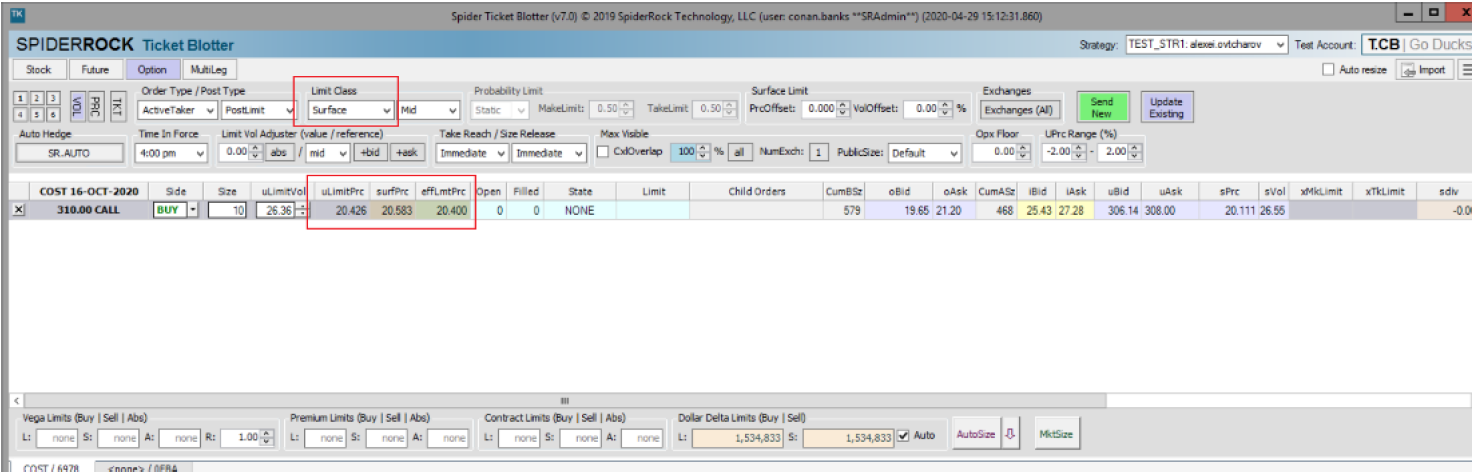
ActiveTaker / PostLimit order working with a user-defined vol limit combined with a secondary limit based on the SpiderRock volatility surface:
- GUI Tools
- SRSE
- FIX
REPLACE INTO srtrade.msgoptordergateway (accnt, clientFirm, spdrActionType, groupingCode, riskGroupId, marketSession, okey_at, okey_ts, okey_tk, okey_yr, okey_mn, okey_dy, okey_xx, okey_cp, orderSide, orderSize, parentOrderHandling, parentBalanceHandling, takeLimitClass, makeLimitClass, orderLimitType, orderVolLimit, autoHedge, traderName, CHECKSUM)
VALUES ('T.ACCNT', 'SRCORE', 'AddReplace', '0010-0000-0867-5309', '0010-0000-0867-5309', 'RegMkt', 'EQT', 'NMS', 'AAPL', 2025, 10, 17, 255, 'Call', 'Sell', 100, 'ActiveTaker', 'PostLimit', 'Surface', 'Surface', 'Vol', .211, 'Spdrauto', 'user.name', 13);
8=FIX.4.4|9=111|35=D|49=SENDER|56=SPIDERROCK|11=ORDER001|1=T.TEST|55=COST|167=OPT|541=20201016|202=310.0|
201=1|54=2|38=100|5094=1|5096=4|5100=1|5102=1|5098=9|5116=0.2636|10=111|Corresponding FIX Tags
Option GUI Tool FIX Tag FIX Value Order Handling ActiveTaker 5094 1 Balance Handling PostLimit 5096 4 Take Limit Class Surface 5100 1 Make Limit Class Surface 5102 1 Order Limit Type Vol 5098 9 -
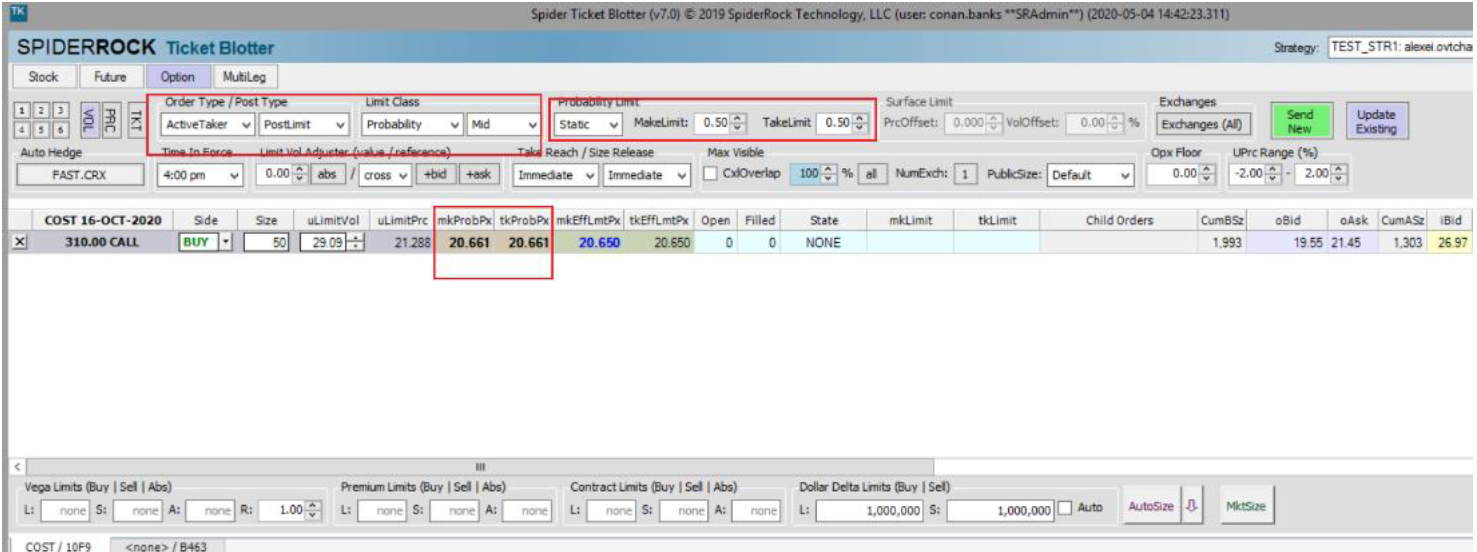
ActiveTaker / PostLimit order working with a user-defined vol limit combined with a secondary limit based on Probabilities for both the making (.50) and taking (.50) sides.
- GUI Tools
- SRSE
REPLACE INTO srtrade.msgoptordergateway (accnt, clientFirm, spdrActionType, groupingCode, riskGroupId, marketSession, okey_at, okey_ts, okey_tk, okey_yr, okey_mn, okey_dy, okey_xx, okey_cp, orderSide, orderSize, parentOrderHandling, parentBalanceHandling, takeLimitClass, makeLimitClass, takeAlphaType, makeAlphaType, takeProbability, makeProbability, orderLimitType, orderVolLimit, autoHedge, traderName, CHECKSUM)
VALUES ('T.ACCNT', 'SRCORE', 'AddReplace', '0011-0000-0867-5309', '0011-0000-0867-5309', 'RegMkt', 'EQT', 'NMS', 'AAPL', 2025, 10, 17, 255, 'Call', 'Sell', 100, 'ActiveTaker', 'PostLimit', 'Probability', 'Probability', 'Static', 'Static', .50, .50, 'Vol', .21, 'Spdrauto', 'user.name', 13);
Multi-Leg Algos
Seeker, Seek/Legger, Legger are multi-leg strategies used by clients who are interested in trading strike-specific spreads.
Seeker
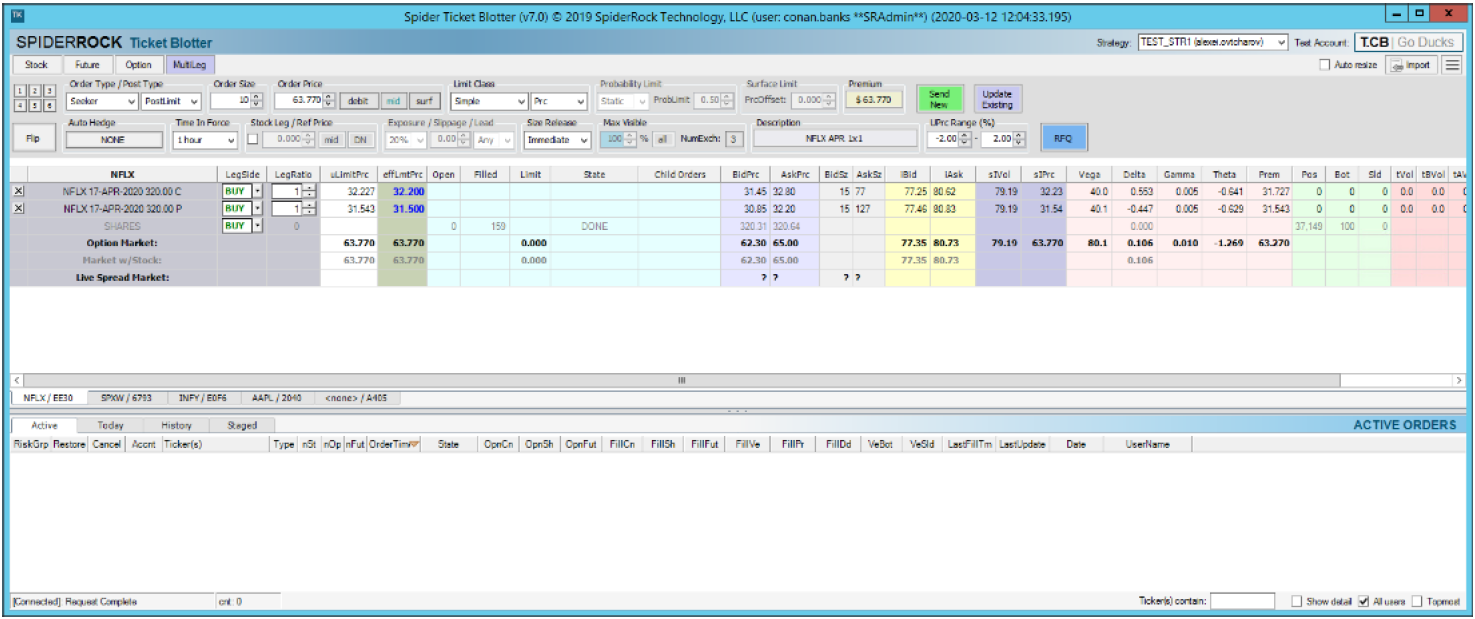
Sending orders to the Complex Order Books (COB) via Seeker allows a multi-leg order to trade as a package, with no leg risk. For example, sending a call spread with a size of 10 means that 10 packages of the call spread are being sent to the COB.
Seek/Legger, Legger
These two order types work multi-leg orders by legging each leg in the exchange order books to seek price improvement. These order types introduce leg risk that is assumed by the user. Our engines will post orders at a level that will allow our system to take the other leg (by sending IOC orders) if the posted leg is filled. Our system will also only post size based on the amount of take size available on the other leg.
To mitigate leg risk, the user can use Exposure and Slippage. Exposure limits the size to a maximum size amount (based on a % of total order size). Slippage represents the worst amount that a user is willing to pay in order to complete a legged package. The slippage amount (in pennies) only comes into play if the order is legged. Being legged means that part of the order (the posted leg) gets filled and our system missed the completion of the other leg when sending an IOC. This can occur when the market is moving fast. Slippage gives room to chase a single leg if needed. Once that leg fills and the package unit is whole, the order continues to work at the original order price.
With any of our multi-leg strategies, the user can choose a posting algo to work a multi-leg order. If the user does not select a posting strategy and is using Seeker/Leg or Legger then the order will only take liquidity when both legs are available at the user price. The SpiderRock Probabilities and Volatility Surface can also be leveraged as secondary limits.
GUI and SRSE Examples
-
Seeker
- GUI Tools
- SRSE
REPLACE INTO srtrade.msgmlegordergateway (accnt, clientFirm, spdrActionType, ticker_at, ticker_ts, ticker_tk, ordersize, marketSession, orderDuration, twapsliceCnt, parentOrderHandling, parentBalanceHandling, orderLimitType, orderPrcLimit, takeLimitClass, makeLimitClass, traderName, groupingCode, riskGroupId, numOptionLegs, okey1_at, okey1_ts, okey1_tk, okey1_yr, okey1_mn, okey1_dy, okey1_xx, okey1_cp, mult1, side1, positiontype1, okey2_at, okey2_ts, okey2_tk, okey2_yr, okey2_mn, okey2_dy, okey2_xx, okey2_cp, mult2, side2, positiontype2, CHECKSUM)
VALUES ('T.ACCNT', 'SRCORE', 'AddReplace', 'EQT', 'NMS', 'AAPL', 100, 'RegMkt', 600, 1, 'Seeker', 'PostLimit', 'PRC', 10.15, 'Simple', 'Simple', 'user.name', '0012-0000-0867-5309', '0012-0000-0867-5309', 2, 'EQT', 'NMS', 'AAPL', 2025, 10, 17, 255, 'Call', 1, 'BUY', 'Auto', 'EQT', 'NMS', 'AAPL', 2025, 10, 17, 255, 'Put', 1, 'Buy', 'Auto', 13); -
Seeker/Legger
- GUI Tools
- SRSE
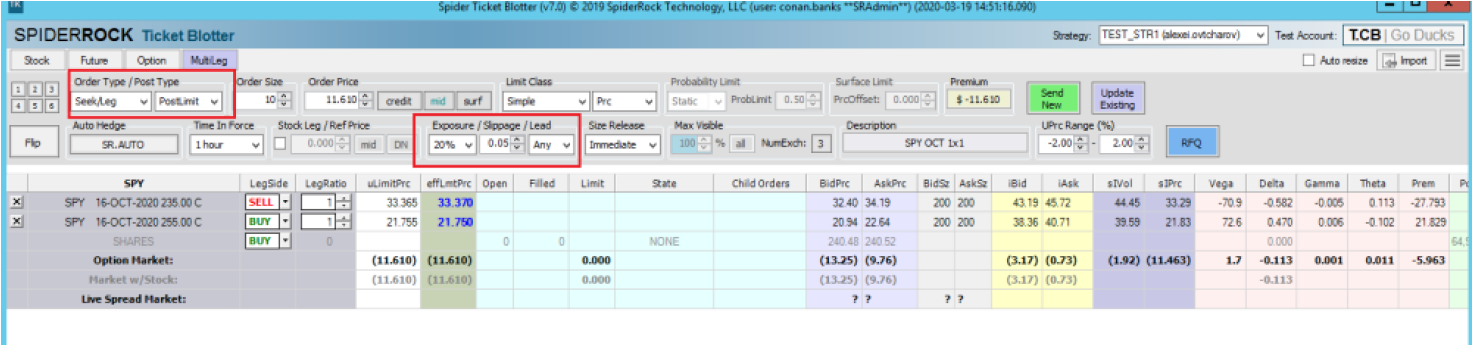
REPLACE INTO srtrade.msgmlegordergateway (accnt, clientFirm, spdrActionType, ticker_at, ticker_ts, ticker_tk, ordersize, marketSession, orderDuration, progressRule, startType, parentOrderHandling, parentBalanceHandling, takeLimitClass, makeLimitClass, maxExposureSize, maxCompletionSlippage, orderLimitType, orderPrcLimit, optPremium, traderName, groupingCode, riskGroupId, numOptionLegs, okey1_at, okey1_ts, okey1_tk, okey1_yr, okey1_mn, okey1_dy, okey1_xx, okey1_cp, mult1, side1, positiontype1, okey2_at, okey2_ts, okey2_tk, okey2_yr, okey2_mn, okey2_dy, okey2_xx, okey2_cp, mult2, side2, positiontype2, CHECKSUM)
VALUES ('T.ACCNT', 'SRCORE', 'AddReplace', 'EQT', 'NMS', 'SPY', 100, 'RegMkt', 300, 'None', 'None', 'seekerlegger', 'PostLimit', 'Simple', 'Simple', 20, .05, 'PRC', -2.96, -2.96, 'user.name', '0013-0000-0867-5309', '0013-0000-0867-5309', 2, 'EQT', 'NMS', 'SPY', 2025, 10, 17, 665, 'Call', 1, 'Sell', 'Auto', 'EQT', 'NMS', 'SPY', 2025, 10, 17, 670, 'Call', 1, 'Buy', 'Auto', 13); -
Legger
- GUI Tools
- SRSE
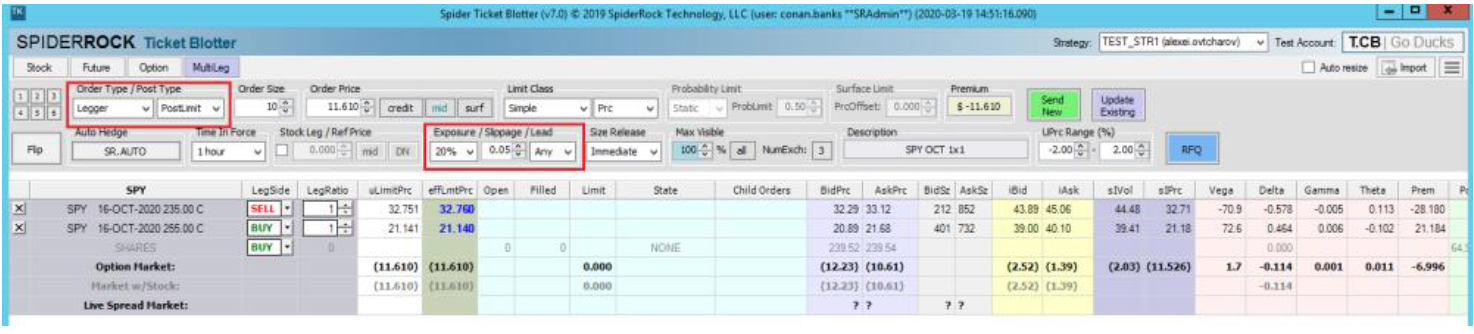
REPLACE INTO srtrade.msgmlegordergateway (accnt, clientFirm, spdrActionType, ticker_at, ticker_ts, ticker_tk, ordersize, marketSession, orderDuration, progressRule, startType, parentOrderHandling, parentBalanceHandling, takeLimitClass, makeLimitClass, maxExposureSize, maxCompletionSlippage, orderLimitType, orderPrcLimit, optPremium, traderName, groupingCode, riskGroupId, numOptionLegs, okey1_at, okey1_ts, okey1_tk, okey1_yr, okey1_mn, okey1_dy, okey1_xx, okey1_cp, mult1, side1, positiontype1, okey2_at, okey2_ts, okey2_tk, okey2_yr, okey2_mn, okey2_dy, okey2_xx, okey2_cp, mult2, side2, positiontype2, CHECKSUM)
VALUES ('T.ACCNT', 'SRCORE', 'AddReplace', 'EQT', 'NMS', 'SPY', 100, 'RegMkt', 300, 'None', 'None', 'legger', 'PostLimit', 'Simple', 'Simple', 20, .05, 'PRC', -3.04, -3.04, 'user.name', '0014-0000-0867-5309', '0014-0000-0867-5309', 2, 'EQT', 'NMS', 'SPY', 2025, 10, 17, 665, 'Call', 1, 'Sell', 'Auto', 'EQT', 'NMS', 'SPY', 2025, 10, 17, 670, 'Call', 1, 'Buy', 'Auto', 13);
Progression Algos
TwapAlpha, VwapAlpha, SpdrPulse are progression algos. Rather than being a separate routing behavior, a progression algo adds a schedule on top of the taking and posting algos described above: it splits the parent order into quantity slices and works each slice at increasing levels of aggressiveness, starting with passive posting and escalating toward taking.
This section summarizes how they work. For full details, more examples, and the complete parameter reference, see Progression Algos.
How the Algos Differ
| Algo | Moves to the Next Slice | Available For |
|---|---|---|
| TwapAlpha | When the slice's target time has elapsed, so the order works for its full duration | Equities, options, futures, and multi-leg orders |
| VwapAlpha | When the slice has filled and market volume has reached the participation target | Equities and futures |
| SpdrPulse | Immediately after the previous slice fills (default slice duration is 30 seconds) | Equities, options, futures, and multi-leg orders |
TwapAlphaC and VwapAlphaC are equity variations that also send any remaining balance into the closing auction.
For a detailed side-by-side comparison, including default order parameters, see the Progression Algo Summary.
How Each Slice Escalates
Each slice works through the following modes, using the ActiveMaker and ActiveTaker algos described above:
| Mode | ActiveMaking | ActiveTaking |
|---|---|---|
| Passive | PostLimit, slightly better than fair mid-market | Takes at a 50% or higher alpha probability |
| Moderate | PostImprove, stepping up to slightly worse than fair mid-market | Takes at a 40% (options) or 49% (stock and futures) probability |
| Aggressive | PostImprove, stepping up to the full parent limit (add-liquidity only) | Same as moderate mode |
| Try Take | — | Crosses the market, up to the full parent limit |
| Legger (multi-leg only, optional) | — | Takes in the individual leg markets |
Multi-leg orders working in the complex order books do not take liquidity in passive or moderate mode.
GUI, SRSE, and FIX Examples
A progression algo is selected with the progressRule field in SRSE (FIX tag 5054), alongside the order's routing settings. The GUI example shows where TwapAlpha is selected on the order ticket. The SRSE and FIX examples buy 100 SPY puts over 1 hour in 6 slices, working each slice with ActiveTaker / PostLimit; the Market limit lets the order cross the market to complete by the end of the hour.
- GUI Tools
- SRSE
- FIX
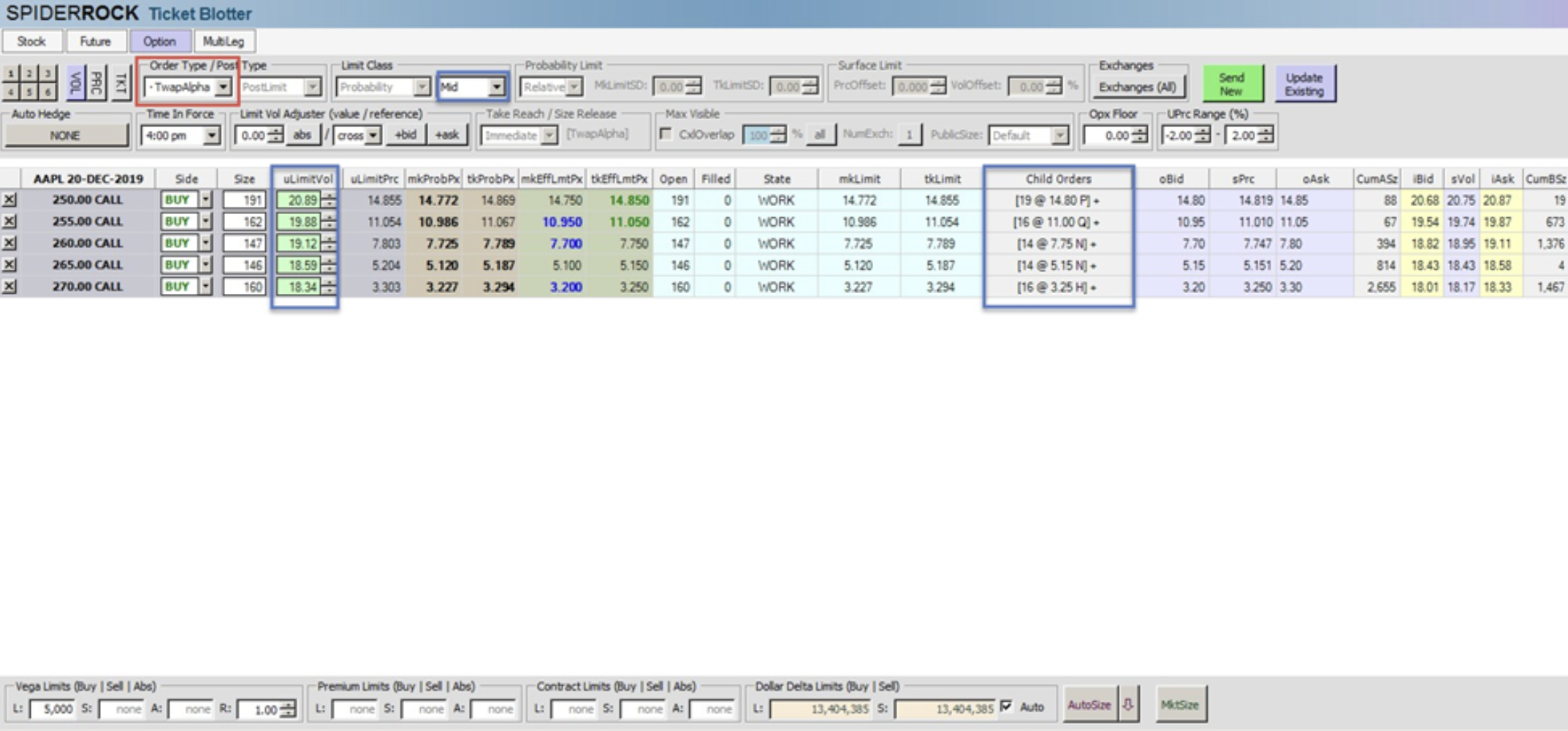
REPLACE INTO srtrade.msgoptordergateway (accnt, clientFirm, spdrActionType, groupingCode, riskGroupId, okey_at, okey_ts, okey_tk, okey_yr, okey_mn, okey_dy, okey_xx, okey_cp, orderSide, orderSize, orderLimitType, parentOrderHandling, parentBalanceHandling, takeLimitClass, makeLimitClass, progressRule, twapSliceCnt, marketSession, orderDuration, traderName, CHECKSUM)
VALUES ('T.ACCNT', 'SRCORE', 'AddReplace', '0100-0000-0867-5309', '0100-0000-0867-5309', 'EQT', 'NMS', 'SPY', 2025, 10, 17, 665, 'Put', 'Buy', 100, 'Market', 'ActiveTaker', 'PostLimit', 'Simple', 'Simple', 'TwapAlpha', 6, 'RegMkt', 3600, 'user.name', 13);
8=FIX.4.4|9=111|35=D|49=SENDER|56=SPIDERROCK|11=ORDER001|1=T.TEST|55=SPY|167=OPT|541=20251017|202=665.0|201=0|
54=1|38=100|5094=1|5096=4|5098=0|5054=7|5056=6|5086=3600|10=111|
Corresponding FIX Tags
| Option | GUI Tool | FIX Tag | FIX Value |
|---|---|---|---|
| Progress Rule | TwapAlpha | 5054 | 7 |
| Progress Slice Count | Twap Slice Count | 5056 | 6 |
| Order Handling | ActiveTaker | 5094 | 1 |
| Balance Handling | PostLimit | 5096 | 4 |
| Order Limit Type | Market | 5098 | 0 |