SR Analytics
Overview
- Live and prior day SpiderRock Connect live surfaces
- Live and prior day implied volatilities and greeks
- Rate curve, dividend, and earning estimates
- Historical underlying volatility tables
SR Analytics Tables
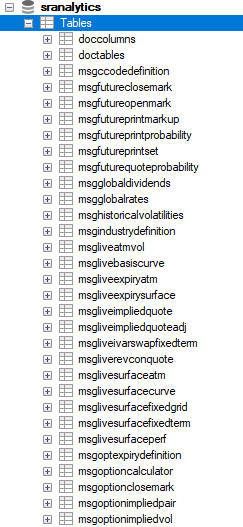
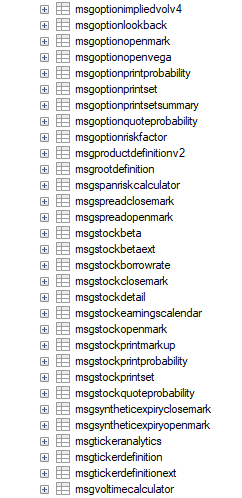
Query Examples
LiveImpliedQuoteAdjust Table
The LiveImpliedQuoteAdj table is the most heavily used table within SR Analytics. It contains option NBBO data, the midpoint of the underlying, the SpiderRock volatility surface, and all corresponding Greeks.
This table is primarily used for scanning trade ideas and calculating client-specific PnL values. There are two calculation sources for this table: loop and tick.
- The loop process updates all values continuously.
- If the NBBO changes for a given strike, that strike exits the loop and performs an immediate update.
- Additionally, if the underlying price moves while the option NBBO remains unchanged, the implied markets are adjusted to reflect the updated underlying price.
Sample Query 1: To check the LiveImpliedQuoteAdj table:
SELECT * FROM sranalytics.msgliveimpliedquoteadj WHERE okey_at = 'EQT';
Sample Query 2: Check live implied quote in December 5th AAPL with strikes above 180
SELECT * FROM sranalytics.msgliveimpliedquoteadj WHERE okey_tk='AAPL' AND okey_mn=12 AND okey_dy=5 AND okey_xx > 180

OptionQuoteProbability Table
A complementary table to LiveImpliedQuoteAdj is OptionQuoteProbability. This table contains option NBBO data along with the top-level bid and ask sizes. It also displays the bid-take and ask-take probabilities. These probabilities are the same metrics displayed in the Symbol Viewer. Clients can also check the trailing 10-minute average market width calculation within this table.
Sample Query 3: To check the OptionQuoteProbability table:
SELECT * FROM sranalytics.msgoptionquoteprobability WHERE okey_at = 'EQT';

OptionPrintSet Table
Clients can view prints in SR Analytics. Within the OptionPrintSet table, each print record displays the individual trade details along with the total volume for the day. For every print, SR Analytics provides a full markup that includes the corresponding SpiderRock surface values and Greeks as they were at the time of the print.
Sample Query 4: To check the OptionPrintSet table:
SELECT * FROM sranalytics.msgoptionprintset WHERE okey_at = 'EQT';

Live Surface ATM & Live Surface Curve Tables
Clients can view the full SpiderRock curve records in the livesurfacecurve and livesurfaceatm records. All the forward expiration values as well as all the spline points are represented.
SELECT * FROM sranalytics.msglivesurfacecurve WHERE ekey_at = 'EQT' AND ekey_tk = 'AAPL';
SELECT * FROM sranalytics.msglivesurfaceatm WHERE ekey_at = 'EQT' AND ekey_tk = 'AAPL';
Sample Query 5: To check for all available surfaces in June AAPL options:
SELECT * FROM sranalytics.msglivesurfaceatm WHERE ekey_tk='AAPL' AND ekey_mn=6;

Global Rates, Dividends, and Stock Earnings Calendar Tables
SpiderRock provides access to the risk-free rates and dividend values used in the calculation of SpiderRock volatility surfaces. Clients can also view the earnings calendar referenced in these calculations. Sample Queries 6-8: To check the GlobalRates, GlobalDividends, and StockEarningsCalendar tables:
SELECT * FROM sranalytics.msgglobalrates;
SELECT * FROM sranalytics.msgglobaldividends;
SELECT * FROM sranalytics.msgstockearningscalendar;
Stock Dividend Detail Table
To view upcoming dividends and the time remaining until the next dividend, refer to the StockDetail table:
SELECT * FROM sranalytics.msgstockdetail;
Sample Query 9: To check the list of stocks announcing earnings in the next 3 days:
SELECT * FROM sranalytics.msgstockdetail WHERE nextEarnDays < 3 AND nextEarnDays > 0;

Definition Tables
Sample Queries 10-12: To check the RootDefinition, OptionExpiryDefinition, and IndustryDefinition tables:
SELECT * FROM sranalytics.msgrootdefinition WHERE root_at = 'EQT';
SELECT * FROM sranalytics.msgoptexpirydefinition;
SELECT * FROM sranalytics.msgindustrydefinition;
Sample Queries 13 & 14: The Tickerdefinition and Tickerdefinitionext tables have all the different ways a security can be labeled, such as the BBG composition, OCC, Lei, CFI, CIC, etc.
SELECT * FROM sranalytics.msgtickerdefinitionext;
SELECT * FROM sranalytics.msgtickerdefinition WHERE ticker_at = 'EQT';
Sample Query 15: To check the SpiderRock opening marks and greeks for SPY, refer to the OptionOpenMark table:
SELECT * FROM sranalytics.msgoptionopenmark where okey_tk='SPY';

Sample Query 16: To check the SpiderRock close mark for AAPL, refer to the StockCloseMark table:
SELECT * FROM sranalytics.msgstockclosemark WHERE ticker_tk='AAPL';

Sample Query 17: To check the beta values for TSLA, refer to the StockBeta table:
SELECT * FROM sranalytics.msgstockbeta WHERE ticker_tk='TSLA';

Sample Query 18: To check for upcoming discrete dividends, refer to this table:
SELECT * FROM sranalytics.msgsrdiscretedividend WHERE divStatus='DivPaying';
