SRSE
The SpiderRock Storage Engine or SRSE (pronounced "SAR-see") is our proprietary relational database that provides a SQL interface to the SpiderRock Connect Live Messaging Platform. SRSE consists of a MariaDB 10.11.4 database whose data is managed by our proprietary in-memory storage engine.
SRSE listens to all live records flowing through the SpiderRock message bus and makes the current leading-edge data available using MySQL bulk SELECT syntax. Rows selected from SRSE tables represent the current (most recent) version of corresponding live data records within the SpiderRock Connect trading platform. Through SRSE, clients can access live equity, options, and futures NBBO prices, implied volatilities, Greeks, prints, risk records, and much more.
SRSE is also a high-throughput gateway via which clients can easily upload parent orders that are tightly integrated with SpiderRock Connect's execution algorithms and the SpiderRock Connect GUI tools. Clients can also upload position files, locates, restricted lists, theoretical models, and other data via SRSE. Rows inserted into SRSE tables are published as live data records that are then consumed elsewhere in the platform.
This guide provides practical examples of queries for each database so that a client can be proficient in using SRSE as quickly as possible. Additional spec files are available upon request.
Note: Many of the live multicast streams that feed data to SRSE servers can be accessed directly from the wire using SpiderRock Connect's multicast packet handling libraries or by integrating our packet layouts directly into your multicast gateway(s). Contact SpiderRock Client Support Desk for more details.
SRSE Databases Summary
SRSE consists of the following eight databases:
| SRSE Database | Description |
|---|---|
| SR Analytics | - Live and prior day SpiderRock Connect live surfaces - Live and prior day implied volatilities and greeks - Rate curve, dividend, and earning estimates - Historical underlying volatility tables |
| SR Trade | - SpiderRock Connect equity, option, and future parent order management - Parent order executions and parent order reports - Multi-leg parent order management - Upload away executions (drops) |
| SR Live | - U.S. equity, option, and future live quotes and prints - Product definition tables (OCC, CME, ICE, & Equity NMS) - Complex order book quotes and exchange imbalances - High throughout bulk access to full market data universe |
| SR Spread | - U.S. equity options live quotes - U.S. options on futures live quotes and prints - Futures spread market tables |
| SR Auction | - Normalized equity option single leg and complex auction feeds - Auction result analytics |
| SR Risk | - Prior day SpiderRock Connect archived positions and marks - Start-of-period clearing firm positions and marks - SpiderRock Connect executions and inbound away drops - Live position greeks and slide risk across entire portfolio |
| SR Control | - View and manage symbol and user supervisory trade risk controls - Manage borrow rates, locates, and restricted trading lists - Dynamically control algo configuration and delivery instructions - Integrated with SpiderRock GUI tools |
| SR Theo | - Upload parameterized or splined theoretical volatility surfaces - Download per-strike theoretical volatilities, price, and greeks - Manage buy/sell/volatility levels for idea generation and position evaluation - Integrated with SpiderRock GUIs and other SRSE tables |
DocTables and DocColumns
Each SRSE database contains two tables that have metadata about the tables in that database.
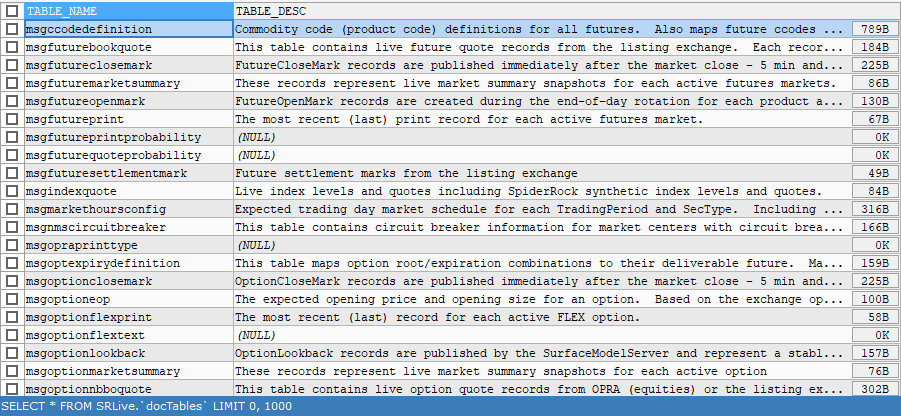
- The docTables table contains descriptions for the tables available within that SRSE database
Query Example:
SELECT * FROM SRLive.`docTables`;
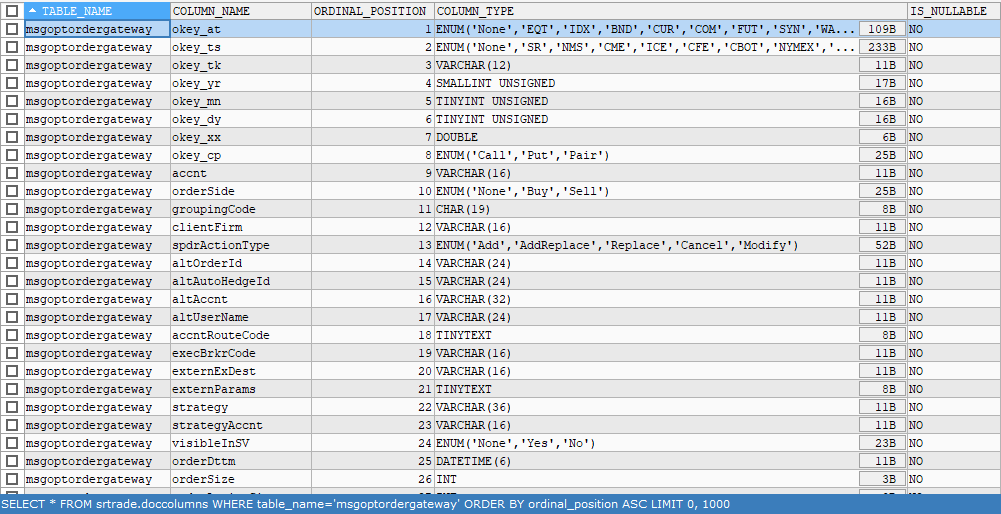
- The docColumns table contains column descriptions, default values, repeating group schemas, and additional column metadata
Query Example:
SELECT * FROM SRTrade.doccolumns WHERE table_name ='msgoptordergateway'
ORDER BY ordinal_position ASC;
How to Connect to SRSE
All SRSE servers are located in the SpiderRock Connect datacenters and managed by SpiderRock. Access to SRSE is available via a MariaDB TCP connection using an assigned address/port combination. SRSE servers are available in our NY5 (Secaucus, New Jersey) datacenter and can be accessed via cross connect or any suitable network connection, including VPNs over the public internet. SRSE can be accessed using SQL console tools or database drivers capable of connecting to MariaDb 10.11.4 or later.
Workflow Example: Implementation of a Systematic Strategy
A typical approach to implement a systematic trading strategy via SRSE can be summarized with the following steps using the coding language of the client’s choice:
- Select the target strike greeks from the msgOptionImpliedQuote table (SRAnalytics).
- Select current risk tallies for all associated executions so far today (SRRisk).
- Compose a parent order basket based on the results from the above queries as well as any additional risk or order handling parameters and insert back into the msgOptOrderGateway table, usually using “LOAD DATA INFILE” syntax. (SRTrade)
- Monitor working parent orders by repeatedly selecting from the msgSrOptBrkrState table (SRTrade) and/or watching the Order Manager tool.
- Monitor any resulting fills by either repeatedly selecting from the msgSrParentExecution table (SRTrade) and/or watching the Order Manager tool.
- Clients typically iterate through the same process to achieve objectives.
Note: If necessary, SpiderRock Connect can drop orders and fills back to the client via FIX, even if the orders were originally uploaded via SRSE.